Guide · v0.7.6

Groovebox

Drum groove generator

A drum sequencer that uses your own sample folders. It sorts samples into lanes, rates how well each fits, and generates patterns per genre, up to a full arranged song.

Freepay what you want

VST3 and standalone app · Windows 64-bit

Made for FL Studio

Download Groovebox
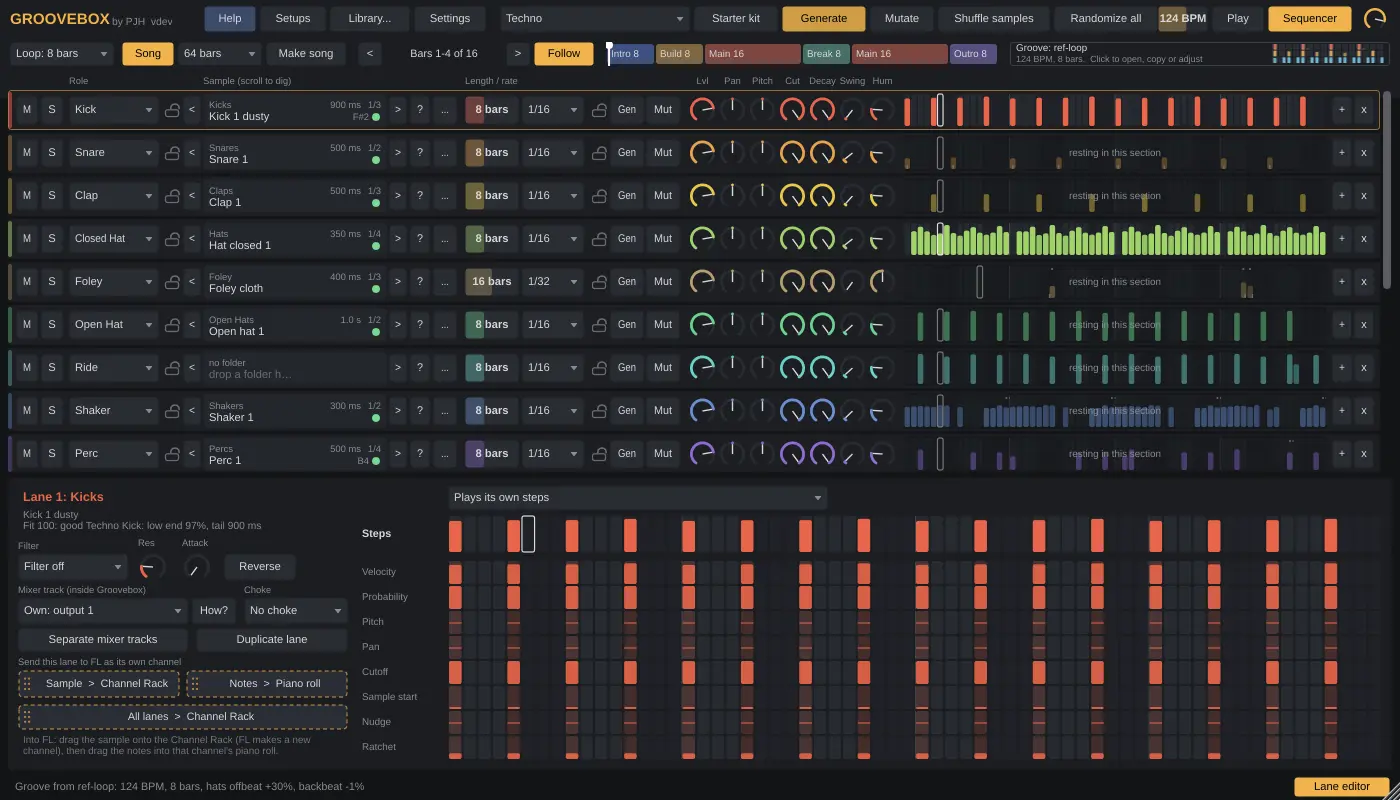
Groovebox plugin window
Lanes with their samples and patterns, song mode across the top, and the lane editor below.
Getting startedThe interfaceSettingsTipsInstall

Getting started

  1. Point it at your samples

    Click Library… and pick your drum folder. Subfolders named kick, snare, hat, clap, perc and so on each get their own lane. Or drop a folder on a single lane.

  2. Generate

    Pick a genre and click Generate (or press G). Press Play in FL, or Play inside Groovebox.

  3. Dig for sounds

    Hover a sample name and scroll to try the next one while the groove plays. Coloured dots show how well each sample fits.

  4. Evolve it

    Mutate (M) changes the groove a little instead of replacing it. Lock a lane to keep it as it is.

  5. Send it to FL

    Drag a lane's sample onto the Channel Rack and its notes into that channel's piano roll, or send all lanes at once.

The interface

From sample folder to groove:

Your libraryLanesSample fitGenerateMutateInto FL

Ctrl+Z undoes almost anything: steps, Generate, Mutate, sample changes and lane settings.

Top bar

Library… / Shuffle samples / Randomize all
Map your library, re-dig every unlocked lane, or get new instruments, samples and patterns in one go.
Starter kit
Sets up the lanes a genre needs, including quiet foley and background beds.
Genre
From house and techno to 2-step, jungle, halftime and hip-hop, plus Hybrid, Free and From reference groove. Picking one sets a typical BPM.
Density / Variation / Irregular
How busy; ghost notes and timing feel; odd lengths and Euclidean patterns.
Loop / Song
How many bars Generate writes (1 to 64), or a full arranged song.

Lanes

M / S / Locks
Mute, solo, and lock the sample, the pattern or both.
< name > ?
Previous and next sample (or scroll), a random good fit, choose a folder.
Length / Rate
1 to 64 steps; 1/4 down to 1/32 with triplets and dotted. Different lengths drift against each other.
Lvl, Pan, Pitch, Cut
Level, pan, pitch and filter, all automatable in FL.
Decay, Swing, Hum
Sample length, swing and humanize per lane.

Lane editor

Click a lane to open it at the bottom.

Step rows
Draw velocity, probability, pitch, pan, cutoff, sample start, nudge and ratchet for every step.
Lane sound
Filter, resonance, attack, reverse, output and choke group (an open hat stopped by the closed one).
Plays
Make a lane answer another lane's hits a few milliseconds later, like a rustle trailing the snare.
Mixer track
Give the lane its own FL mixer track, or share one.

Sample fit

Dots
Green fits the lane and genre well, yellow is usable, red is a poor fit, hollow is still listening.
Why
Hover a sample for the reason, like “too long for a techno closed hat”, and its note for pitched sounds.
Fit filter
Makes scrolling skip poor fits.

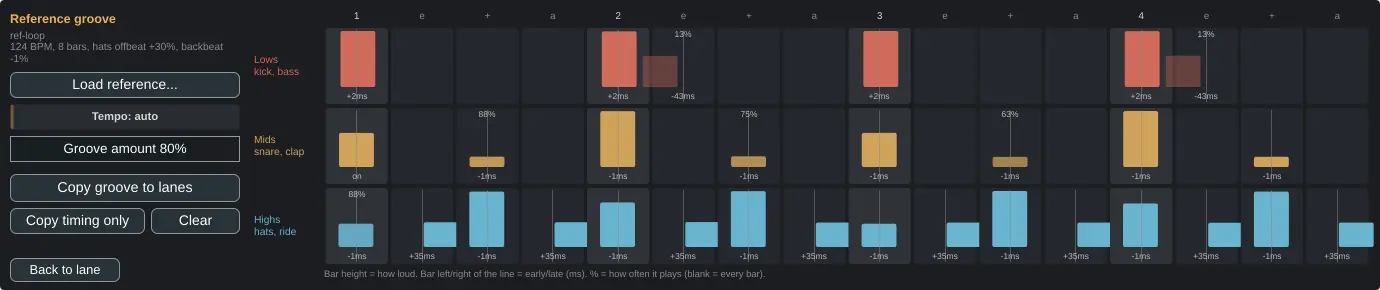
Reference groove

Drop a file
Groovebox finds its tempo and measures how early, late and loud the lows, mids and highs play on every 16th.
Groove amount
How far your lanes lean into that feel.
Copy groove / Copy timing only
Write the reference's hits and accents into your lanes, or only its push and drag.

Song mode

Make song
Pick 32 to 128 bars. Groovebox writes intro, build, main, break and outro, and decides which lanes play where.
Song strip
Click or drag to scrub. Lanes sitting out the current section are dimmed.

Setups

Save setup
Folders, samples, patterns and knobs in one file.
Last session
A new Groovebox starts where you left off, and autosaves every few seconds.
MIDI file
Save all lanes as one .mid (C3 = lane 1).

Hover any control in the plugin and the bar at the bottom explains it. The ? button opens the built-in help.

Settings

Under the gear icon. They apply to every copy of the plugin on your computer.

Density / Variation / IrregularDefaults for how Generate writes.
Swing x / Humanize xScale every lane's swing and humanize. Automatable.
Mutate amountHow much Mutate changes each time.
Fit filterSkip poor-fit samples when scrolling.

Tips

Install

Copy

Unzip the download and copy the .vst3 folder to C:\Program Files\Common Files\VST3\. Replace the old one when you update.

Scan

In FL Studio open Options › Manage plugins and click Find installed plugins. Tick Groovebox so it shows in your list, then add it to the Channel Rack.

Windows warning

The files aren't code signed yet, so Windows may say “unknown publisher”. Click More info, then Run anyway.

Free during early access

Download Groovebox

Download Groovebox
Other pluginsVocalboxBassboxGlowbox